NOTE: AtomZ is no longer being offered. We will be providing a tutorial for an alternative product as soon as we locate an appropriate replacement
How to set up the AtomZ site search engine on your Fusion web site
This is a 5 page tutorial so select continue at the bottom of each page to read all of it
The 1st thing that you will need to do is to go to the AtomZ web site and sign up for an account with them. Their search service is FREE for sites under 500 pages. Make note of your account name and your password (it will be emailed to you also). Make note of the account number that is assigned to you when you create your account
Step 1
In Page view, select the Form Area tool from the Standard toolbar, and draw a rectangle in the Layout area or the MasterBorder.
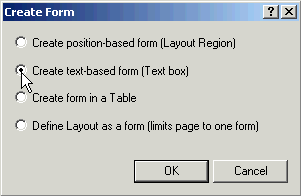
When the Create Form dialog appears. Select "Create text-based form (Text box)" from the list. Click OK.
Continue on to Step 2The remaining 4 pages of this tutorial are no longer accessible as the AtomZ product no longer is available
This page was written by and is maintained by turtle
|