|
NetObjects Fusion keeps track of everything you use in your web site, from images to objects, to links. You can find out what is currently being used in your web site project by verifying all of your assets from Assets View
To get into Assets View click the Assets View Icon on the tool bar
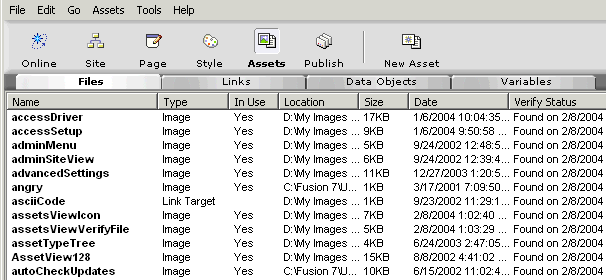
Once you are in Assets View you will see 4 tabs with the labels Files, Links, Data Objects, and Variables. Each tab will show you the various component parts that are associated with the web site project you are working on.
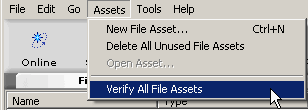
To find out what images are currently in use and which ones are in your assets folder but not being used click on the File tab. Then from the menu bar select Assets > Verify All File Assets.
Once the verification process is finished you will see which images are no longer being used in your web site project along with the type of asset, whether it is "In Use", where the asset is located on your computer, its size, the date it was created and the last date you verified
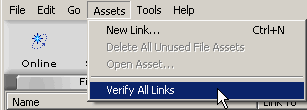
You can verify all links on your web site project, both internal and external by clicking on the Links tab. Then from the Menu bar selecting Assets > Verify All Links. Note: You must be connected to the net in order to verify remote web site links outside of your Fusion site project.
Verifying links can be a long process depending on how many external links you have in your web site project
You should verify all file assets and delete unused assets before you export your site as a template for safe backups. Read the Backup tutorial for more information on this process
Did you find this tutorial useful? Would like to view all of our tutorials and support pages?
Join the NetObjects Fusion Users Group Community
This page was written by and is maintained by turtle
|