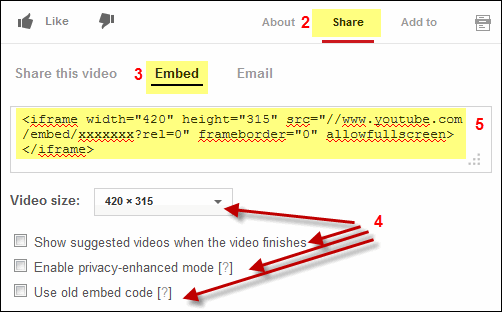
Select the video size and options you want and they will be written into the code box for you.
Copy all of the code to your windows clipboard (ctrl+A to highlight then ctrl+C to copy)
Inserting the youtube code in Fusion
Draw a text box or single celled table on your page. Press ctrl+T to bring up the html insert dialog box
Paste the youtube video in the dialog box and press OK
You will see a small blue circle with a T inside of it to indicate the embedded code
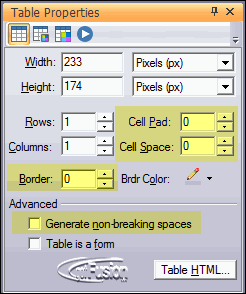
Note: If you notice the position of your video shifts from what you see in page view or extra spaces appear use a single celled table instead of a text box. Make sure borders, padding, and spacing is set to 0 (zero) and that the "generate non-breaking spaces" option is un-checkeed
The youtube video will look like this on your page.
Did you find this tutorial useful? Do you want to keep this resource online? Make a donation to keep gotFusion alive
This page was written by and is maintained by turtle














 to indicate the embedded code